Statement B: understand your Payroc merchant statement
Not sure which statement you have? Start with Understand your statement and compare both the cover-page address position and your pricing structure. These guides explain Payroc merchant statements.
This article explains how to read your statement, which contains details about your transactions and the fees associated with processing transactions with us. For an overview about the types of fees in your statement, go to Fees in your statement.
We produce two different statements, and the statement that you receive depends on your pricing structure. You receive Statement B if you’re on one of the following pricing structures:
- Interchange +
- Interchange ++
- Interchange +++
Statement B has our address at the upper-left corner of the cover page, below our brand logo, for example:
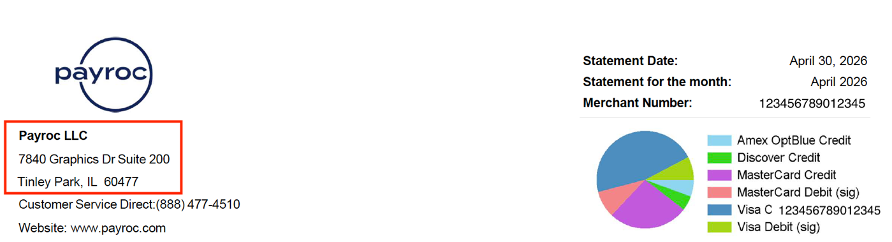
If you’re on any of the following pricing structures and our address is at the top-right corner, go to Statement A:
- Interchange +
- Tiered Pricing
- Flat Rate
- RewardPay Choice
- Consumer Choice
- Cash Rewards
Statement structure
The statement contains the following sections:
- Overview – Merchant account information, the statement period, and a summary of processing fees and sales.
- Processing Activity Summary – Total number and amount of sales and returns split by card type.
- Summary of Fees – Processing fees split by card type.
- Daily Merchant Activity – Daily batches and any deductions.
- Statement Notice – Important updates from us and third-party services.
- Detail Interchange to Card Issuers – Interchange fees split by card brand.
- Detail Card Association/Network Fees – Card association fees split by card brand.
- Payroc LLC Fees – Payroc fees and miscellaneous fees.
Overview
The Overview contains your merchant account information, statement period, and a summary of transactions for each card type.
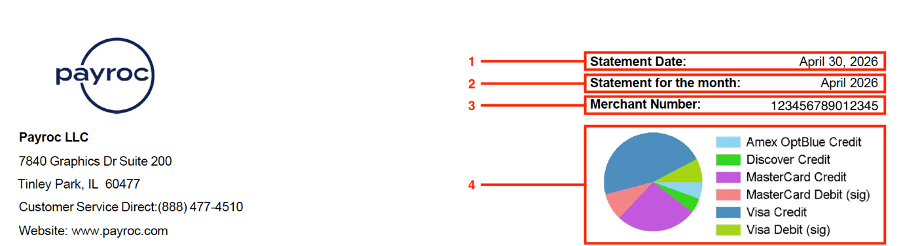
The Overview includes the following information:
| Number | Description |
|---|---|
| 1 | The last day of the statement period. |
| 2 | Statement month. |
| 3 | Your merchant ID (MID). |
| 4 | A pie chart that shows your total sales for each card type. |
Processing Activity Summary
The Processing Activity Summary is your sales and returns split by card type.
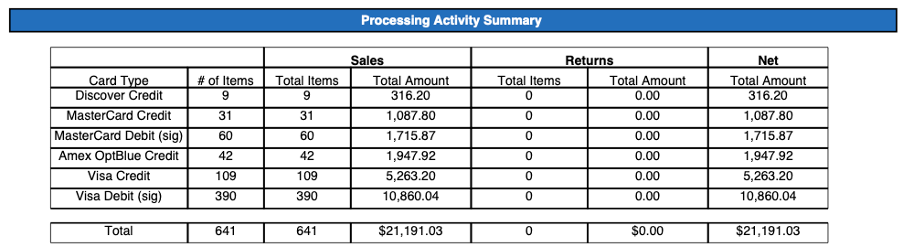
The Summary includes the following information:
- # of Items – Number of sales and returns split by card type.
- Sales – Number of sales and amount of sales split by card type.
- Returns – Number of returns and amount of returns split by card type
- Net – Total amount of Credit Sales minus Returns.
Summary of Fees
The Summary of Fees is your processing fees for the month.
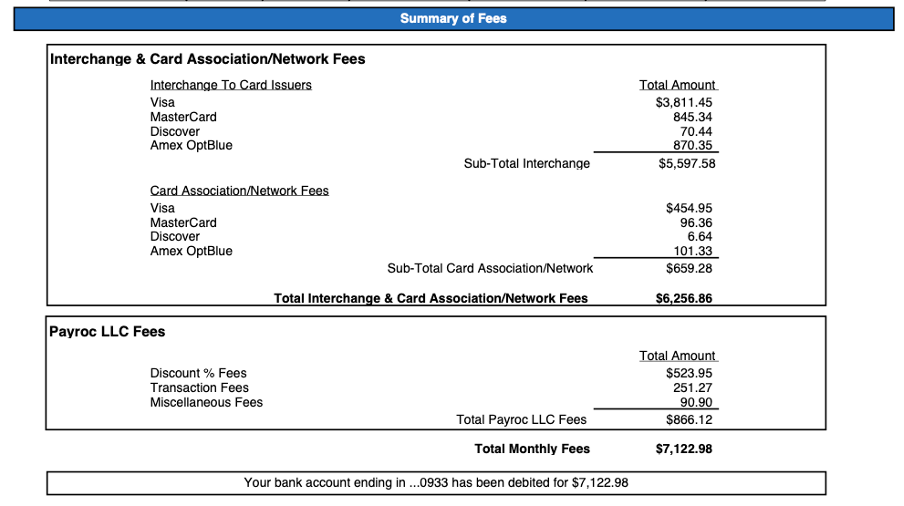
The Summary of Fees includes the following information:
| Label | Description |
|---|---|
| Interchange & Card Association/Network Fees | Interchange and card association fees split by card brand. |
| Payroc LLC Fees | Payroc and miscellaneous fees. The Payroc fees consist of Discount % Fees and Transaction Fees. |
| Total Monthly Fees | Cost of processing your card transactions for the month. It includes fees from the card brands, Payroc, and miscellaneous fees. |
Statement summary | Total amount that we took from your bank account or sent to your bank account. Note: If we can’t take the balance from your bank account, our Collections Team will contact you by email to settle the payment. |
Daily Merchant Activity
The Daily Merchant Activity is your daily batches and any deductions.
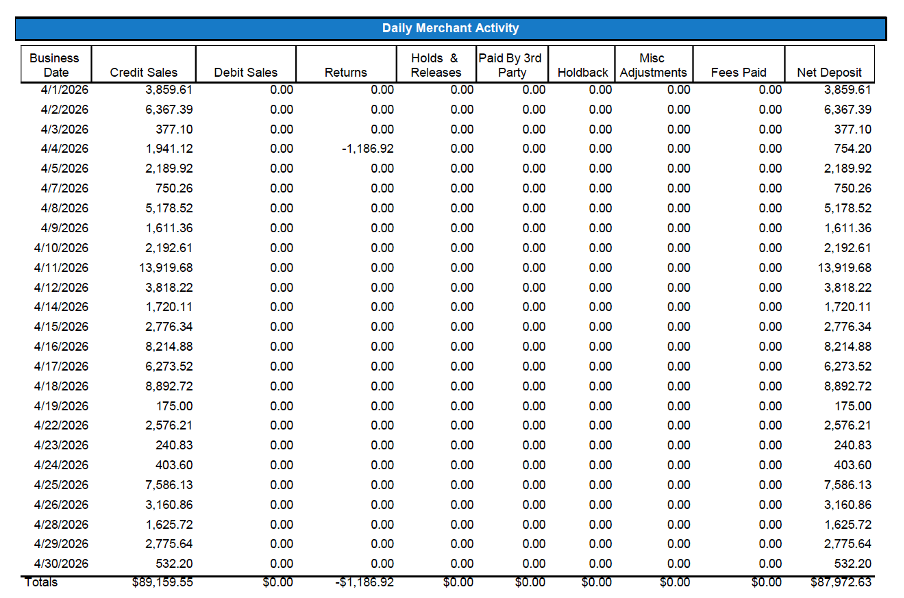
The Daily Merchant Activity includes the following information:
| Label | Description |
|---|---|
| Business Date | Date of the batch. |
| Credit Sales | Amount of credit sales and signature debit sales. |
| Debit Sales | Amount of PIN debit sales. |
| Returns | Amount of returns. |
| Holds & Releases | Amount that we withheld for suspicious transactions. We investigate these transactions and temporarily withhold them from your daily sales. |
| Paid by 3rd Party | Amount from the American Express (Amex) Electronic Statement Account (ESA) program. If you’ve signed up for this direct processing program, Amex processes your transactions and sends the funds to your Amex account. |
Holdback | Amount that we withheld for the following reasons: You have a loan to repay from a cash advance company. You’ve signed up for Autosave or Easy Pay and have instructed us to transfer a percentage of your total sales to an account of your choice. You have a tax lien imposed by the federal authority. |
| Misc Adjustments | Any miscellaneous fees, for example, chargebacks and equipment purchases. |
| Fees Paid | Amount of fees you’ve paid throughout the statement month if you’ve signed up for Daily Billing. If you didn’t sign up for Daily Billing, this column displays a value of zero. |
| Net Deposit | Amount that we send to your bank account. |
Statement Notice
The Statement Notice contains important updates from us and third-party services.
Examples of updates you receive in your statement include:
- Pricing changes
- Marketing content
- Insights reminders
- Tax reminders on 1099-K
Detail Interchange to Card Issuers
The Detail Interchange to Card Issuers is your interchange fees split by card brand.
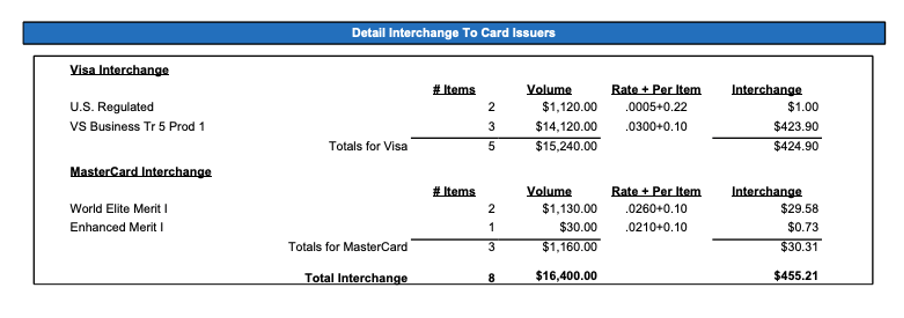
The Detail Interchange to Card Issuers includes the following information:
| Label | Description |
|---|---|
| # Items | Number of transactions that the fee applies to. |
| Volume | Transaction amount that the fee applies to. |
| Rate + Per Item | Rate of the interchange fee, for example, a rate of 0.0005 + 0.22 means a rate of 0.0005 plus a fixed fee of $0.22 for each transaction. |
| Interchange | Amount that you pay for the fee. |
Detail Card Association/Network Fees
The Detail Card Association/Network Fees is your card association fees split by card brand.
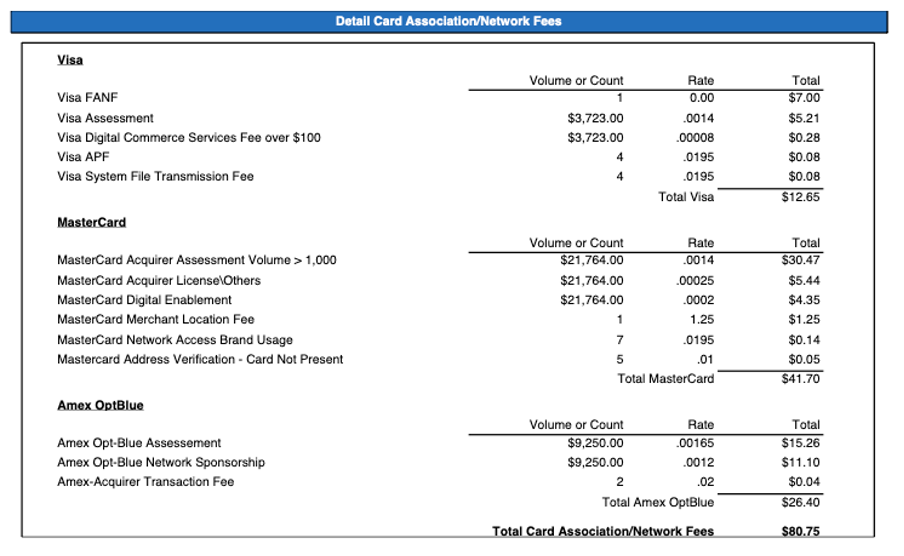
The Detail Card Association/Network Fees includes the following information:
| Label | Description |
|---|---|
| Volume or Count | Transaction amount or the number of transactions that the fee applies to. |
| Rate | Rate of the card association fee, which is either a percentage of your transaction or a fixed fee for each transaction. |
| Total | Amount that you pay for the fee. |
Payroc LLC Fees
The Payroc LLC Fees is your Payroc fees and miscellaneous fees.
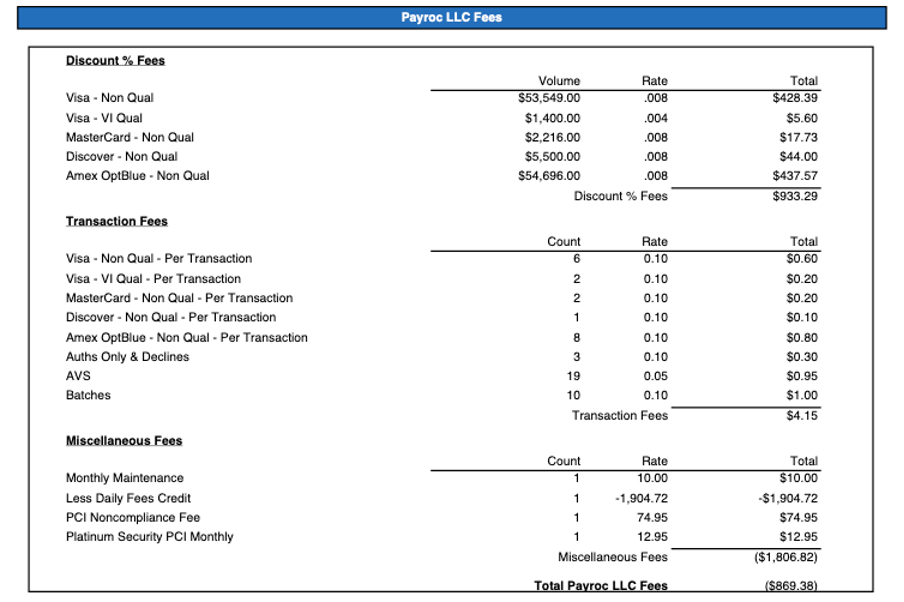
The Payroc LLC Fees includes the following information:
| Label | Description |
|---|---|
| Discount % Fees | Rate of the Payroc fee, which is a percentage of your transaction. |
| Transaction Fees | Fixed fee that Payroc charges for each transaction. |
Miscellaneous Fees | Miscellaneous fees from Payroc and third-party services. If you’ve signed up for Daily Billing, the Less Daily Fees Credit shows the amount of fees that you’ve paid throughout the statement month. |
| Volume | Transaction amount that the fee applies to. |
| Count | Number of transactions that the fee applies to. |
| Rate | Rate of the fee, which is either a percentage of your transaction or a fixed fee for each transaction. |
| Total | Amount that you pay for the fee. |